
A PDF can pass a quick "has tags" check and still read like gibberish in NVDA or JAWS — because tag presence is not the same as correct reading order, especially in scans, multi-column layouts, and STEM documents with nested tables.
Reading order is the quiet foundation of document accessibility compliance. Get it right and screen readers, Braille displays, and every downstream format follow the same logic a sighted reader gets from the page.
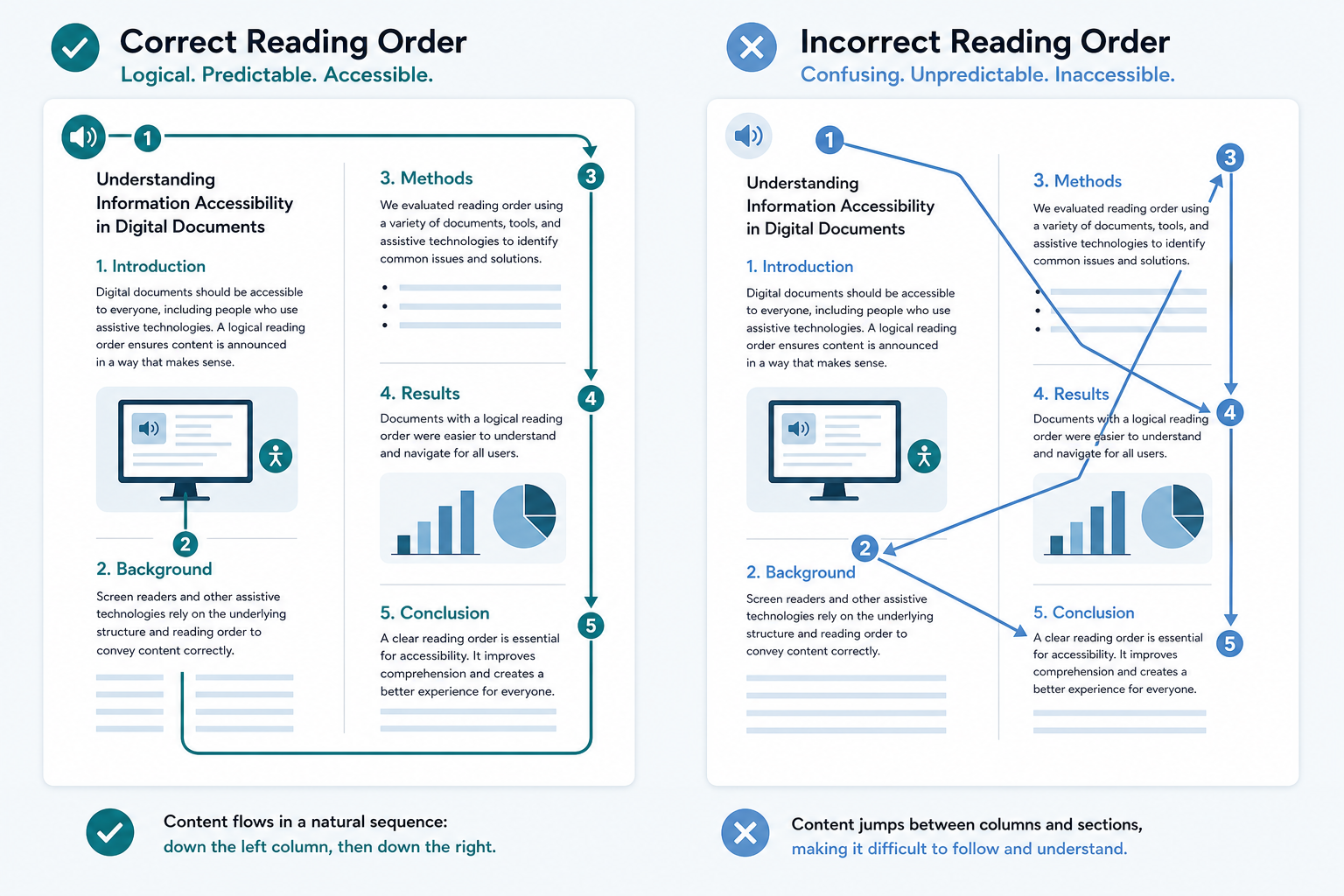
Why screen readers struggle with most PDFs
PDFs are visual-first containers. Without explicit structure, assistive technology guesses — and guesses wrong on:
- Multi-column academic papers (reads across columns instead of down)
- Scanned exams (OCR text without logical block order)
- Nested tables (header relationships lost)
- Footnotes and sidebars (inserted mid-paragraph in the reading flow)
The reading order is the map. A wrong map sends everyone the wrong way.
PDF/UA in one operational sentence
PDF/UA (ISO 14289) requires that PDF structure supports reliable machine interpretation — not just human appearance. For practitioners, that translates to:
| Requirement | Practical check |
|---|---|
| Tagged content | Every text block has a role (H1, P, Table, Figure) |
| Reading order | Tag order matches intended narration |
| Table headers | Header cells identified; scope defined |
| Figures | Alt text or replacement text on meaningful images |
| Language | Document and passage language set correctly |
Scanned vs. born-digital — different failure modes
Born-digital PDFs often export without tags from Word or InDesign. Fix: re-export with tagging enabled, or remediate the structure.
Scanned PDFs need OCR plus structural reconstruction. OCR alone produces selectable text with no guarantee of reading order — the hardest class of remediation, and where generic automation frequently fails on complex tables and equations. Morf Transformation handles nested tables and STEM-heavy PDF structure as first-class workflows, not edge cases.
A 15-minute validation checklist
- Open the structure panel — are headings real heading roles, not styled paragraphs?
- Navigate by headings only — can you reach every section?
- Read one data table — are column headers announced before cell values?
- Check one figure — is alt text present and meaningful (not something like "image1.png")?
Fail any item and it is structural repair before format conversion.
Reading-order fixes with the highest ROI
- Document title and heading hierarchy
- Table header scope, including multi-page tables
- Reading order in multi-column and scanned layouts
- Figure alt text on content-bearing images
What changes in your pipeline tomorrow
Tomorrow: Take one faculty's PDF that students complain about. Open its structure panel. If reading order does not match the visual layout, flag it for structural repair before generating BRF or HTML conversions. One corrected source file improves every downstream format from that point forward.
Next step: Upload your hardest PDF and compare tag structure in the output from Morf.